Schema Markup for Local SEO: How to Dominate Local Search in 2026
Learn how to implement LocalBusiness schema markup to boost your local SEO. Step-by-step guide with JSON-LD examples that pass Google's Rich Results Test.
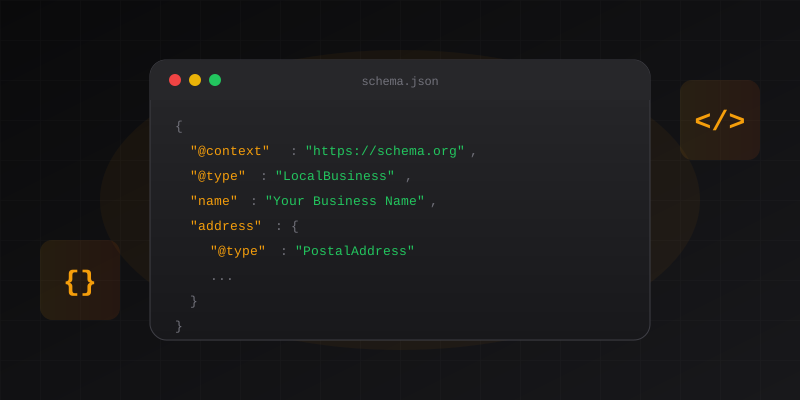
Key Takeaways
- LocalBusiness schema is essential for local SEO in 2026—it tells Google exactly what your business is, where it's located, and when it's open
- 70% of local businesses have no schema markup, creating a massive opportunity for those who implement it correctly
- Use specific subtypes like
Dentist,Attorney, orRestaurantinstead of genericLocalBusiness - JSON-LD is the only format you should use—it's Google's preferred method and easiest to implement
- Always validate with Google's Rich Results Test before going live — common plugin errors can break your schema
Schema markup for local SEO is how you communicate directly with Google about your client's business. Without it, Google has to guess what the business is, where it's located, and when it's open. With proper LocalBusiness schema, Google knows exactly.
Here's the reality: 70% of local businesses have no schema markup at all. That's not a problem—that's an opportunity.
What is LocalBusiness Schema?#
LocalBusiness schema is a specific type of structured data that tells search engines detailed information about a physical business location. It's part of the schema.org vocabulary and is fully supported by Google, Bing, and other major search engines.
Why LocalBusiness Matters in 2026
Google's AI-powered search (including AI Overviews) relies heavily on structured data to understand entities. When someone asks their phone "Where's the best dentist near me?", Google looks for verified, structured LocalBusiness entities—not just keywords on a page.
The schema includes critical business information:
- Business name and type (Restaurant, Dentist, Attorney, etc.)
- Physical address with geo-coordinates
- Opening hours for each day of the week
- Contact information (phone, email)
- Services offered and pricing
- Payment methods accepted
When implemented correctly, this data can trigger rich results in local search, including enhanced business listings and knowledge panel information.
Why Local Businesses Need Schema Markup#
Google says schema markup isn't a direct ranking factor. This is technically true—and practically misleading.
Here's what actually happens when you add LocalBusiness schema:
The Real Impact#
- Schema enables rich results in search (star ratings, hours, price range)
- Rich results get higher click-through rates (20-30% higher in studies)
- Higher CTR sends positive engagement signals to Google
- Better engagement correlates with better rankings
Connect the dots. Schema may not be a "ranking factor," but its effects certainly influence rankings.
Pro Tip
Beyond rankings, LocalBusiness schema helps Google show accurate business hours in search results, display your business in relevant "near me" queries, populate knowledge panels with correct information, and understand which services you offer.
Which Schema Type Should You Use?#
This is where most agencies make their first mistake. They use generic LocalBusiness when a more specific subtype exists.
Google prefers specificity. A law firm marked as LocalBusiness instead of Attorney misses out on rich results specific to legal services.
Common LocalBusiness Subtypes#
| Business Type | Correct Schema Type | Wrong Choice |
|---|---|---|
| Restaurant | Restaurant | LocalBusiness |
| Dentist | Dentist | MedicalBusiness |
| Law Firm | Attorney or LegalService | LocalBusiness |
| Plumber | Plumber | HomeAndConstructionBusiness |
| Doctor | Physician | MedicalBusiness |
| Hair Salon | HairSalon | HealthAndBeautyBusiness |
| Auto Repair | AutoRepair | AutomotiveBusiness |
| Real Estate | RealEstateAgent | LocalBusiness |
| Gym | HealthClub | SportsActivityLocation |
| Vet | Veterinarian | MedicalBusiness |
Common Mistake
Using MedicalBusiness when you should use Dentist, or HealthAndBeautyBusiness when you should use HairSalon. Always drill down to the most specific subtype available.
Required vs. Recommended Fields#
Google's documentation uses "recommended" to mean "we won't show your rich result without this." Treat recommended fields as required.
Required Fields#
These fields must be present for valid LocalBusiness schema:
@type— The specific business type (e.g.,Dentist)name— Business name exactly as registeredaddress— Full postal address usingPostalAddresstypetelephone— Primary phone number with country code
Strongly Recommended Fields#
Without these, you're unlikely to see rich results:
geo— Latitude and longitude coordinatesopeningHoursSpecification— Business hours for each dayurl— Business website URLimage— Business photo or logo URLpriceRange— Price indicator ($to$$$$)
Optional But Valuable#
areaServed— Service areas for mobile businessespaymentAccepted— Payment methods (Cash, Credit Card, etc.)aggregateRating— Review summary (if you have reviews)sameAs— Social media profile URLs
Step-by-Step Implementation Guide#
Follow these five steps to implement LocalBusiness schema correctly.
Determine the Correct Schema Type
Look up your business category on schema.org/LocalBusiness. Start at LocalBusiness and drill down to the most specific subtype that applies.
For example:
- A pizza restaurant →
Restaurant(or even more specifically,Pizzeriaif you want) - A personal injury lawyer →
Attorney - A dental clinic →
Dentist
Rule of thumb: If a more specific type exists, use it.
Gather Business Information
Collect all required information before writing any code:
- Exact business name (as registered, matching Google Business Profile)
- Complete address (street, city, state, ZIP, country)
- Phone number with country code (e.g.,
+1-555-123-4567) - Website URL (https preferred)
- Opening hours for each day of the week
- Geo-coordinates (use Google Maps to find exact lat/long)
Finding Geo-Coordinates
Open Google Maps, right-click on your business location, and click the coordinates that appear. They'll be copied to your clipboard. Format: latitude, longitude (e.g., 30.2672, -97.7431).
Write the JSON-LD Schema
Here's a complete, production-ready example for a dental practice:
{
  "@context": "https://schema.org",
  "@type": "Dentist",
  "name": "Bright Smile Dental",
  "image": "https://brightsmile.com/images/office.jpg",
  "url": "https://brightsmile.com",
  "telephone": "+1-555-123-4567",
  "email": "hello@brightsmile.com",
  "priceRange": "$$",
  "address": {
    "@type": "PostalAddress",
    "streetAddress": "123 Main Street, Suite 100",
    "addressLocality": "Austin",
    "addressRegion": "TX",
    "postalCode": "78701",
    "addressCountry": "US"
  },
  "geo": {
    "@type": "GeoCoordinates",
    "latitude": 30.2672,
    "longitude": -97.7431
  },
  "openingHoursSpecification": [
    {
      "@type": "OpeningHoursSpecification",
      "dayOfWeek": ["Monday", "Tuesday", "Wednesday", "Thursday", "Friday"],
      "opens": "09:00",
      "closes": "17:00"
    },
    {
      "@type": "OpeningHoursSpecification",
      "dayOfWeek": "Saturday",
      "opens": "09:00",
      "closes": "13:00"
    }
  ],
  "sameAs": [
    "https://www.facebook.com/brightsmiledental",
    "https://www.instagram.com/brightsmiledental"
  ]
}
Key points:
- Use 24-hour time format (
09:00not9:00 AM) - Include country code in phone number
- Always use HTTPS for URLs
- Geo-coordinates should be numbers, not strings
Add Schema to Your Website
Place the JSON-LD in a <script> tag in your page's <head> section:
<head>
  <title>Bright Smile Dental - Austin, TX</title>

  <!-- LocalBusiness Schema -->
  <script type="application/ld+json">
    {
      "@context": "https://schema.org",
      "@type": "Dentist",
      "name": "Bright Smile Dental",
      ...
    }
  </script>
</head>
Where to add it:
- Homepage — Required
- Contact page — Recommended
- Location pages — Required for multi-location businesses
- All pages — Optional (some SEOs do this, no evidence it helps)
Validate Before Going Live
Run your page through Google's Rich Results Test before publishing.
- Go to Google Rich Results Test
- Enter your page URL or paste your code
- Check for errors and warnings
- Fix any issues and re-test
Don't Skip Validation
Common errors that will break your schema: missing required fields, invalid date formats (using 17:00:00 instead of 17:00), malformed JSON (missing commas or brackets), and URLs that return 404 errors. If you're using a WordPress plugin, check why it might be failing the Rich Results Test.
Common Mistakes to Avoid#
After auditing hundreds of LocalBusiness schema implementations, these are the mistakes we see most often:
1. Using Generic Schema Types#
Wrong: Marking a restaurant as LocalBusiness
Right: Marking a restaurant as Restaurant
Google has over 100 LocalBusiness subtypes. Use the most specific one available.
2. Inconsistent NAP Data#
Your Name, Address, and Phone number must match exactly across:
- Schema markup
- Google Business Profile
- Website footer
- Local citations
123 Main St and 123 Main Street are NOT the same to Google.
3. Wrong Opening Hours Format#
Wrong: opens: "9:00 AM"
Right: opens: "09:00"
Hours must use 24-hour format. Midnight is 00:00, not 24:00.
4. Missing Geo-Coordinates#
Without latitude and longitude, Google can't accurately place your business on maps. This field is technically "recommended" but practically required for local pack visibility.
5. Copy-Pasting from Other Sites#
Schema copied from another site will have:
- Their geo-coordinates (wrong location)
- Their URL references
- Possibly the wrong business type
Always generate fresh schema for each client.
Testing and Monitoring#
After implementing schema, monitor these tools:
Google Search Console#
Check the Enhancements section for:
- Valid items (schema detected and working)
- Items with errors (broken schema)
- Items with warnings (missing recommended fields)
Rich Results Test#
Use this for instant validation:
Schema Markup Validator#
Tests against the full schema.org spec:
? Frequently Asked Questions
Does schema markup directly improve local rankings?
Schema itself isn't a direct ranking factor, but it enables rich results that improve click-through rates. Higher CTR sends positive engagement signals. The indirect effect on rankings is real and measurable.
How long until schema appears in search results?
Google needs to recrawl your page and process the schema. This typically takes a few days to a few weeks. You can request indexing in Search Console to speed things up.
Should I add LocalBusiness schema to every page?
Add it to your homepage and contact page at minimum. For multi-location businesses, each location page needs its own schema. Adding it to every page provides no additional benefit.
Can I have multiple LocalBusiness schemas on one page?
Only if you genuinely have multiple business locations at distinct addresses. Don't add multiple schemas for the same location.
What if my business serves multiple areas?
Use the areaServed property to specify service areas. You can list cities, regions, or use GeoShape for custom areas. This is especially important for service-area businesses like plumbers or electricians.
Is JSON-LD better than Microdata?
Yes. JSON-LD is Google's recommended format. It's cleaner, easier to maintain, doesn't interfere with your HTML, and is the only format Google's documentation uses for examples.
Generate Schema Without the Manual Work#
Manually creating LocalBusiness schema takes 2-3 hours when you account for research, writing, validation, and fixing errors. For agencies managing 20+ clients, that's 40-60 hours per month on schema alone. And if you're relying on WordPress plugins that output broken JSON-LD, you're adding even more debugging time.
SchemaDash generates Google-compliant LocalBusiness schema in under 5 minutes:
- Select your business type from 20+ categories
- Fill in the business details
- Get copy-paste ready JSON-LD
- Pre-validated to pass Rich Results Test
Stop copying JSON-LD from Stack Overflow. Start generating schema that actually works.
Generate Schema in Minutes, Not Hours
Stop copying JSON-LD from Stack Overflow. SchemaDash generates Google-compliant schema markup that passes the Rich Results Test every time.
Start Your Free TrialRelated Articles
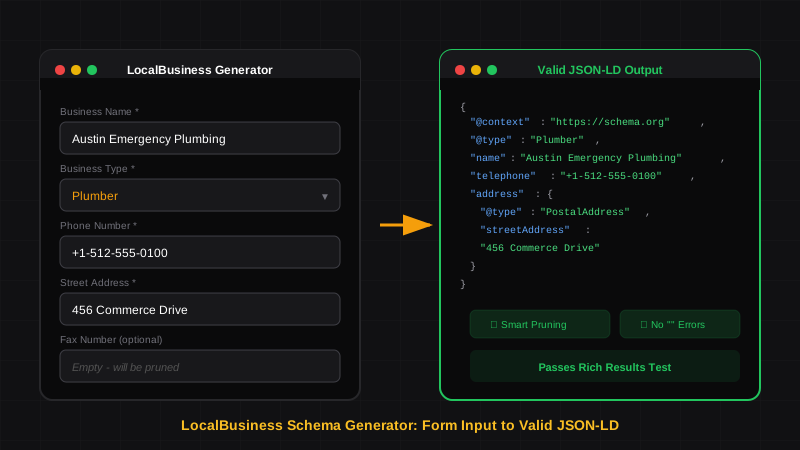
LocalBusiness Schema That Actually Works
Generate LocalBusiness schema markup that passes Google's Rich Results Test. Learn what makes a good schema generator and how to avoid common validation errors.
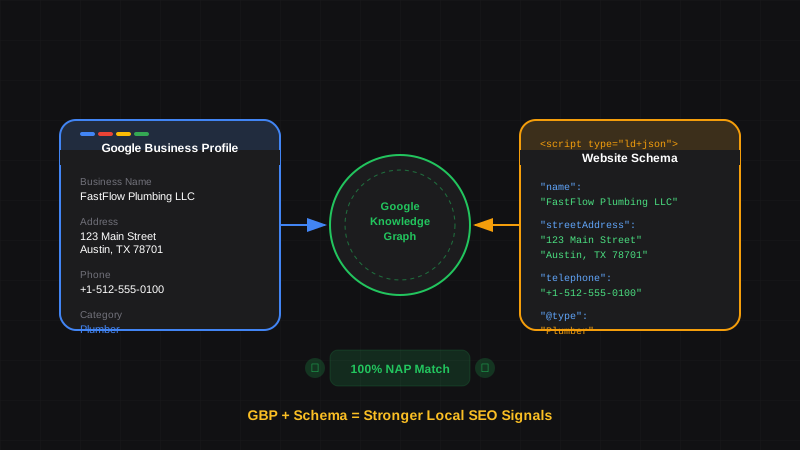
Google Business Profile and Schema Markup: How They Work Together for Local SEO
Learn how Google Business Profile and website schema markup work together. Align your GBP data with LocalBusiness schema for stronger local rankings and Knowledge Panels.
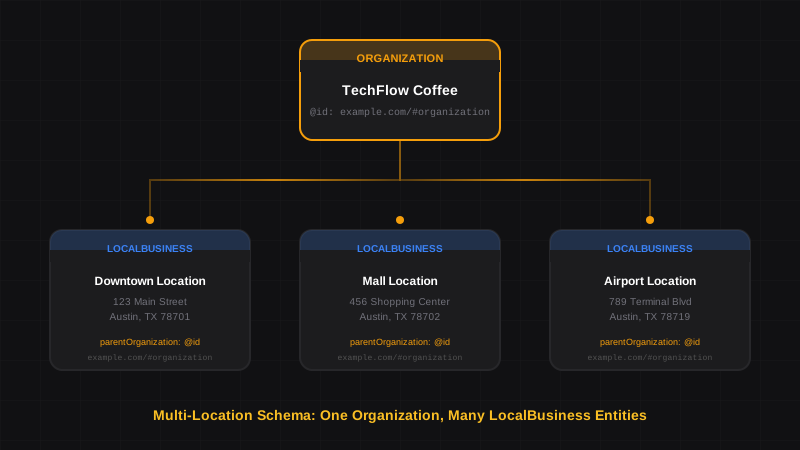
Schema Markup for Multi-Location Businesses: Franchises, Chains & Retail
Learn how to implement schema markup for multi-location businesses. Connect franchises, restaurant chains, and retail stores with proper Organization and LocalBusiness linking.