Service Area Business Schema: How Plumbers, Electricians & Mobile Services Should Use LocalBusiness
Learn how to implement schema markup for service area businesses. Complete guide with JSON-LD examples for plumbers, HVAC, cleaning services, and other businesses that travel to customers.
Key Takeaways
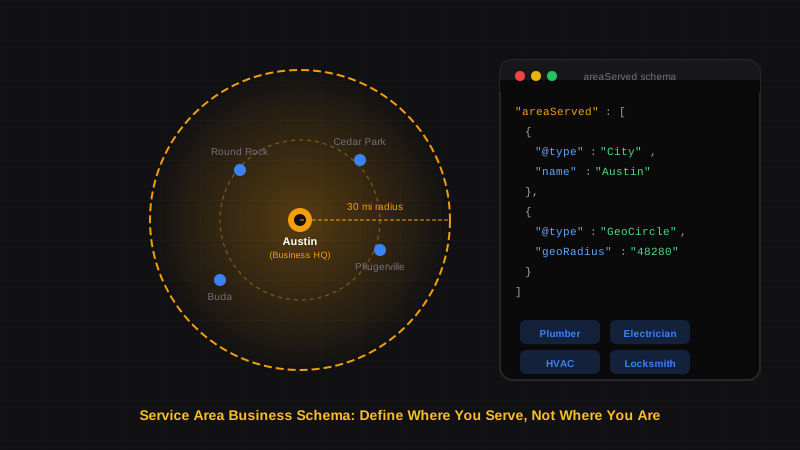
- Service Area Businesses (SABs) use LocalBusiness schema differently — you define where you serve, not where you're located
- The
areaServedproperty is critical — it tells Google the cities, regions, or radius you cover - Hide your street address if you don't serve customers there — use city/region only to avoid confusing Google
- Use specific schema types like
Plumber,Electrician,HVACBusinessinstead of genericLocalBusiness - GeoCircle lets you define a service radius — perfect for businesses serving "within 30 miles"
If you run an SEO agency, you've probably had this conversation with a client: "I'm a plumber. I don't have a storefront. Customers don't come to me — I go to them. How does schema markup even work for my business?"
The answer is Service Area Business (SAB) schema — a specific way of structuring LocalBusiness markup for businesses that travel to customers. Plumbers, electricians, HVAC technicians, cleaning services, mobile mechanics, and dozens of other trades fall into this category.
Here's the complete guide to implementing SAB schema correctly, with copy-paste JSON-LD examples for the most common service industries.
What Makes Service Area Businesses Different#
What is a Service Area Business in local SEO?
A Service Area Business (SAB) is a business that travels to customers rather than serving them at a fixed location. Examples include plumbers, electricians, house cleaners, mobile pet groomers, and HVAC technicians. In Google Business Profile, SABs can hide their physical address and instead display the areas they serve.
The key difference in schema markup is the areaServed property. While a restaurant uses address to tell Google where customers should go, a plumber uses areaServed to tell Google where they're willing to travel.
A schema.org property that specifies the geographic area where a service is provided. It can be defined as a city, state, country, postal code, or even a circular radius around a point. For SABs, this is more important than the business address.
| Business Type | Customers Come To You? | Primary Location Signal |
|---|---|---|
| Restaurant | Yes | address |
| Retail Store | Yes | address |
| Plumber | No | areaServed |
| House Cleaner | No | areaServed |
| Hybrid (e.g., HVAC with showroom) | Both | address + areaServed |
The Core SAB Schema Structure#
Here's the foundation for any service area business. Notice that areaServed is prominently featured while the physical address is simplified.
{
  "@context": "https://schema.org",
  "@type": "Plumber",
  "@id": "https://example-plumbing.com/#business",
  "name": "FastFlow Plumbing",
  "image": "https://example-plumbing.com/logo.png",
  "url": "https://example-plumbing.com",
  "telephone": "+1-555-123-4567",
  "email": "service@example-plumbing.com",
  "description": "Licensed plumber serving Austin and surrounding areas. Emergency repairs, water heater installation, and drain cleaning.",
  "priceRange": "$$",
  "address": {
    "@type": "PostalAddress",
    "addressLocality": "Austin",
    "addressRegion": "TX",
    "addressCountry": "US"
  },
  "areaServed": [
    {
      "@type": "City",
      "name": "Austin",
      "@id": "https://www.wikidata.org/wiki/Q16559"
    },
    {
      "@type": "City",
      "name": "Round Rock"
    },
    {
      "@type": "City",
      "name": "Cedar Park"
    },
    {
      "@type": "City",
      "name": "Pflugerville"
    }
  ],
  "openingHoursSpecification": [
    {
      "@type": "OpeningHoursSpecification",
      "dayOfWeek": ["Monday", "Tuesday", "Wednesday", "Thursday", "Friday"],
      "opens": "07:00",
      "closes": "18:00"
    },
    {
      "@type": "OpeningHoursSpecification",
      "dayOfWeek": "Saturday",
      "opens": "08:00",
      "closes": "14:00"
    }
  ]
}
Wikidata IDs Strengthen Your Schema
Adding a Wikidata @id to your city (like https://www.wikidata.org/wiki/Q16559 for Austin) helps Google disambiguate locations with the same name. It's optional but recommended for major cities.
Address Handling for SABs#
This is where most people get confused. Should you include your home address? Your P.O. Box? Nothing at all?
The rule: Include your address at the city/region level, but omit the street address if customers don't visit that location.
Correct: City-Level Address#
"address": {
  "@type": "PostalAddress",
  "addressLocality": "Austin",
  "addressRegion": "TX",
  "addressCountry": "US"
}
Incorrect: Full Street Address (Hidden Location)#
"address": {
  "@type": "PostalAddress",
  "streetAddress": "1234 Home Office Lane",
  "addressLocality": "Austin",
  "addressRegion": "TX",
  "postalCode": "78701",
  "addressCountry": "US"
}
Match Your Google Business Profile Settings
If you've hidden your address in Google Business Profile (which Google recommends for SABs), don't expose it in your schema. Conflicting signals confuse Google and can hurt your local rankings.
Defining Your Service Area#
The areaServed property accepts several formats. Choose based on how you describe your service area to customers.
Option 1: List of Cities#
Best for businesses serving specific municipalities.
"areaServed": [
  {
    "@type": "City",
    "name": "Austin"
  },
  {
    "@type": "City",
    "name": "Round Rock"
  },
  {
    "@type": "City",
    "name": "Georgetown"
  }
]
Option 2: State or Region#
Best for businesses serving an entire state or large region.
"areaServed": {
  "@type": "State",
  "name": "Texas"
}
Option 3: Radius (GeoCircle)#
Best for businesses that say "we serve within X miles."
"areaServed": {
  "@type": "GeoCircle",
  "geoMidpoint": {
    "@type": "GeoCoordinates",
    "latitude": 30.2672,
    "longitude": -97.7431
  },
  "geoRadius": 50000
}
A schema.org type that defines a circular geographic area using a center point (latitude/longitude) and radius in meters. A 30-mile radius equals approximately 48,280 meters. Use this when your service area is distance-based rather than city-based.
Option 4: Multiple Postal Codes#
Best for hyper-local services in specific ZIP codes.
"areaServed": [
  {
    "@type": "PostalAddress",
    "postalCode": "78701"
  },
  {
    "@type": "PostalAddress",
    "postalCode": "78702"
  },
  {
    "@type": "PostalAddress",
    "postalCode": "78703"
  }
]
Industry-Specific Schema Examples#
Different service industries should use specific schema types, not generic LocalBusiness. Here are the most common ones.
Plumber Schema#
{
  "@context": "https://schema.org",
  "@type": "Plumber",
  "name": "Austin Emergency Plumbing",
  "image": "https://austin-plumbing.com/logo.png",
  "url": "https://austin-plumbing.com",
  "telephone": "+1-512-555-0100",
  "priceRange": "$$",
  "address": {
    "@type": "PostalAddress",
    "addressLocality": "Austin",
    "addressRegion": "TX",
    "addressCountry": "US"
  },
  "areaServed": [
    {"@type": "City", "name": "Austin"},
    {"@type": "City", "name": "Round Rock"},
    {"@type": "City", "name": "Pflugerville"},
    {"@type": "City", "name": "Cedar Park"}
  ],
  "hasOfferCatalog": {
    "@type": "OfferCatalog",
    "name": "Plumbing Services",
    "itemListElement": [
      {
        "@type": "Offer",
        "itemOffered": {
          "@type": "Service",
          "name": "Emergency Drain Cleaning"
        }
      },
      {
        "@type": "Offer",
        "itemOffered": {
          "@type": "Service",
          "name": "Water Heater Installation"
        }
      },
      {
        "@type": "Offer",
        "itemOffered": {
          "@type": "Service",
          "name": "Pipe Repair"
        }
      }
    ]
  }
}
Electrician Schema#
{
  "@context": "https://schema.org",
  "@type": "Electrician",
  "name": "Spark Right Electrical",
  "image": "https://sparkright.com/logo.png",
  "url": "https://sparkright.com",
  "telephone": "+1-512-555-0200",
  "priceRange": "$$",
  "address": {
    "@type": "PostalAddress",
    "addressLocality": "Austin",
    "addressRegion": "TX",
    "addressCountry": "US"
  },
  "areaServed": {
    "@type": "GeoCircle",
    "geoMidpoint": {
      "@type": "GeoCoordinates",
      "latitude": 30.2672,
      "longitude": -97.7431
    },
    "geoRadius": 48280
  },
  "hasOfferCatalog": {
    "@type": "OfferCatalog",
    "name": "Electrical Services",
    "itemListElement": [
      {
        "@type": "Offer",
        "itemOffered": {
          "@type": "Service",
          "name": "Panel Upgrades"
        }
      },
      {
        "@type": "Offer",
        "itemOffered": {
          "@type": "Service",
          "name": "EV Charger Installation"
        }
      },
      {
        "@type": "Offer",
        "itemOffered": {
          "@type": "Service",
          "name": "Whole-Home Rewiring"
        }
      }
    ]
  }
}
HVAC Business Schema#
{
  "@context": "https://schema.org",
  "@type": "HVACBusiness",
  "name": "CoolAir HVAC Services",
  "image": "https://coolair-hvac.com/logo.png",
  "url": "https://coolair-hvac.com",
  "telephone": "+1-512-555-0300",
  "priceRange": "$$$",
  "address": {
    "@type": "PostalAddress",
    "addressLocality": "Austin",
    "addressRegion": "TX",
    "addressCountry": "US"
  },
  "areaServed": [
    {"@type": "City", "name": "Austin"},
    {"@type": "City", "name": "San Marcos"},
    {"@type": "City", "name": "Kyle"},
    {"@type": "City", "name": "Buda"}
  ],
  "hasOfferCatalog": {
    "@type": "OfferCatalog",
    "name": "HVAC Services",
    "itemListElement": [
      {
        "@type": "Offer",
        "itemOffered": {
          "@type": "Service",
          "name": "AC Installation"
        }
      },
      {
        "@type": "Offer",
        "itemOffered": {
          "@type": "Service",
          "name": "Furnace Repair"
        }
      },
      {
        "@type": "Offer",
        "itemOffered": {
          "@type": "Service",
          "name": "Duct Cleaning"
        }
      }
    ]
  }
}
House Cleaning Service Schema#
{
  "@context": "https://schema.org",
  "@type": "HousekeepingService",
  "name": "Sparkle Clean Austin",
  "image": "https://sparkleclean.com/logo.png",
  "url": "https://sparkleclean.com",
  "telephone": "+1-512-555-0400",
  "priceRange": "$$",
  "address": {
    "@type": "PostalAddress",
    "addressLocality": "Austin",
    "addressRegion": "TX",
    "addressCountry": "US"
  },
  "areaServed": [
    {"@type": "City", "name": "Austin"},
    {"@type": "City", "name": "Westlake Hills"},
    {"@type": "City", "name": "Lakeway"}
  ]
}
Available Schema Types for Service Businesses#
Don't use generic LocalBusiness when a specific type exists. Here are schema types for common service industries:
| Industry | Schema Type |
|---|---|
| Plumbing | Plumber |
| Electrical | Electrician |
| HVAC | HVACBusiness |
| Roofing | RoofingContractor |
| House Cleaning | HousekeepingService |
| Locksmith | Locksmith |
| Moving | MovingCompany |
| Pest Control | PestControlService (under HomeAndConstructionBusiness) |
| Landscaping | LandscapersAndLandscapeArchitects (under HomeAndConstructionBusiness) |
| General Contractor | GeneralContractor |
Can't Find Your Type?
If no specific schema type exists for your industry, use HomeAndConstructionBusiness for trades, ProfessionalService for professional services, or LocalBusiness as a last resort. Check schema.org/LocalBusiness for the full hierarchy.
Adding Services with hasOfferCatalog#
The hasOfferCatalog property lets you list specific services you offer. This helps Google understand exactly what you do and can improve your visibility for service-specific searches.
"hasOfferCatalog": {
  "@type": "OfferCatalog",
  "name": "Our Services",
  "itemListElement": [
    {
      "@type": "Offer",
      "itemOffered": {
        "@type": "Service",
        "name": "Emergency Repairs",
        "description": "24/7 emergency service for urgent issues"
      }
    },
    {
      "@type": "Offer",
      "itemOffered": {
        "@type": "Service",
        "name": "Scheduled Maintenance",
        "description": "Regular maintenance to prevent problems"
      }
    }
  ]
}
This is particularly valuable for SABs because you're competing on services, not location convenience.
Common SAB Schema Mistakes#
Don't Include a Street Address You've Hidden in GBP
The #1 mistake: including your full home address in schema when you've hidden it in Google Business Profile. Google sees conflicting signals and may distrust both.
Other common errors:
- Missing
areaServed— Without it, Google doesn't know where you operate - Using generic
LocalBusiness— UsePlumber,Electrician, etc. for better categorization - GeoRadius in miles — The value must be in meters, not miles
- Empty service area arrays — Empty arrays cause schema errors
- Forgetting
openingHoursSpecification— Customers need to know when you're available
Implementation Checklist#
Choose the Right Schema Type
Find the most specific type for your industry. Use Plumber not LocalBusiness. Check schema.org if unsure.
Decide on Address Display
If customers never visit your location, use city-level address only. Match whatever you've set in Google Business Profile.
Define Your Service Area
Choose the format that matches how you describe your coverage: cities, radius, state, or ZIP codes. Be accurate — don't claim areas you won't actually serve.
Add Your Services
Use hasOfferCatalog to list your services. Include your most-searched services and any specialties.
Validate Before Publishing
Test with Google's Rich Results Test. Watch for empty string errors and syntax issues.
? Frequently Asked Questions
Should service area businesses hide their address in schema?
Don't hide it completely — include city and state. But omit the street address if customers don't visit that location. This matches Google's recommendation for SABs in Google Business Profile: show the service area, not the physical address.
How do I define a service radius in schema markup?
Use the GeoCircle type within areaServed. Set geoMidpoint to your center coordinates (latitude/longitude) and geoRadius to your coverage in meters. A 30-mile radius is approximately 48,280 meters.
What schema type should a plumber use?
Use Plumber, not LocalBusiness. Schema.org has specific types for most trades: Electrician, HVACBusiness, RoofingContractor, Locksmith, and more. The specific type helps Google categorize your business accurately.
Can I list multiple cities in my service area?
Yes. Use an array of City objects within areaServed. You can list as many cities as you actually serve. Just be accurate — claiming areas you won't serve can lead to negative reviews and wasted leads.
Should my schema match my Google Business Profile?
Absolutely. If you've hidden your address in GBP and show a service area, your schema should do the same. Conflicting signals between your website schema and GBP confuse Google and can hurt your local rankings.
What's the difference between areaServed and serviceArea?
They're synonyms in schema.org. Google recommends areaServed for consistency, and it's the more commonly used property. Both work, but stick with areaServed for clarity.
Generate Your SAB Schema#
Service area businesses have unique schema requirements, but the fundamentals are the same: clean syntax, specific types, and accurate data.
Use SchemaDash to build your foundation:
- Generate your base LocalBusiness schema with the correct business type
- Copy the output and add the
areaServedblock using the examples above - Add
hasOfferCatalogif you want to list your services - Validate with Google's Rich Results Test
The tool handles smart pruning to remove empty fields — you handle the service area customization.
For multi-location service businesses, use the parentOrganization pattern to link regional crews to your main brand.
Generate Schema in Minutes, Not Hours
Stop copying JSON-LD from Stack Overflow. SchemaDash generates Google-compliant schema markup that passes the Rich Results Test every time.
Start Your Free TrialRelated Articles
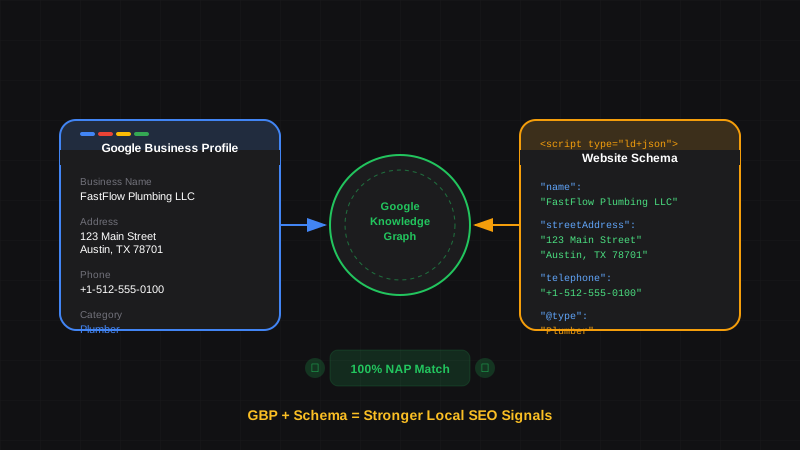
Google Business Profile and Schema Markup: How They Work Together for Local SEO
Learn how Google Business Profile and website schema markup work together. Align your GBP data with LocalBusiness schema for stronger local rankings and Knowledge Panels.
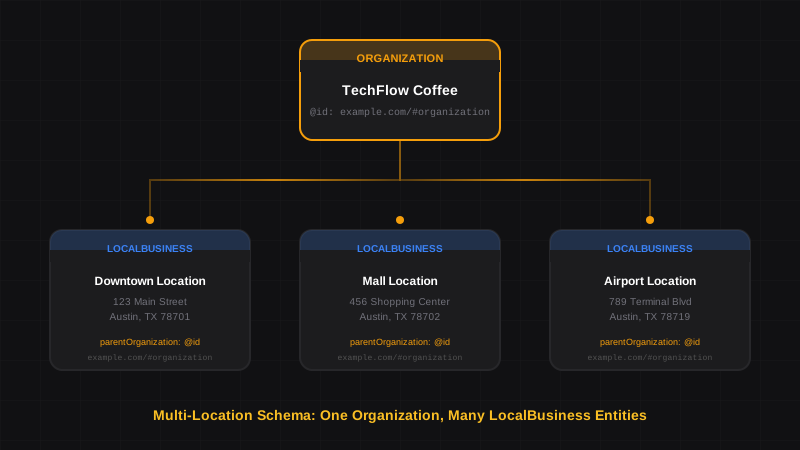
Schema Markup for Multi-Location Businesses: Franchises, Chains & Retail
Learn how to implement schema markup for multi-location businesses. Connect franchises, restaurant chains, and retail stores with proper Organization and LocalBusiness linking.
Schema Markup for Local SEO: How to Dominate Local Search in 2026
Learn how to implement LocalBusiness schema markup to boost your local SEO. Step-by-step guide with JSON-LD examples that pass Google's Rich Results Test.