Schema Markup for Multi-Location Businesses: Franchises, Chains & Retail
Learn how to implement schema markup for multi-location businesses. Connect franchises, restaurant chains, and retail stores with proper Organization and LocalBusiness linking.
Key Takeaways
- Multi-location businesses need two schema types — Organization for the parent brand, LocalBusiness for each physical location
- The
parentOrganizationproperty links locations to your brand — this tells Google all your stores are part of the same company - Each location needs unique schema — same template, different NAP (Name, Address, Phone) data
- Franchises require special handling — franchisees are separate legal entities but share brand identity
- One broken location doesn't sink the rest — schema errors are isolated to individual pages
If you manage SEO for a franchise, restaurant chain, or retail business with multiple locations, you've probably wondered: do I need separate schema for each store? How do I connect them to the parent brand? What happens if one location has incomplete data?
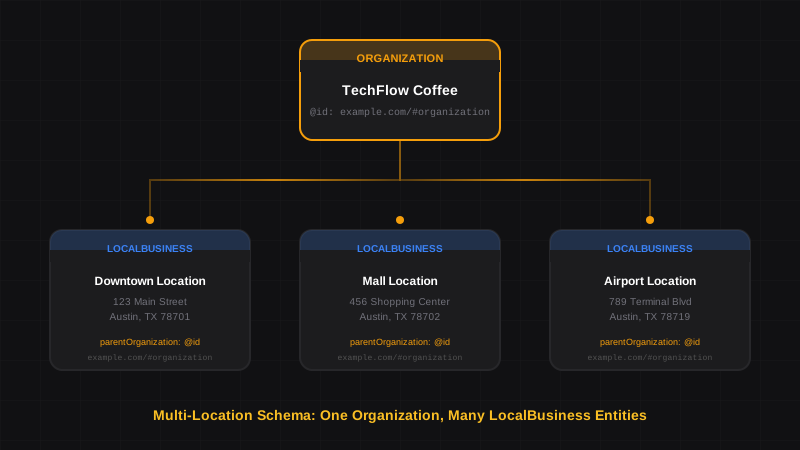
The answer is simpler than most guides make it sound. You need two types of schema working together: Organization for the parent brand, and LocalBusiness for each physical location. The magic happens when you link them with the parentOrganization property.
Here's exactly how to structure it — with copy-paste examples for franchises, restaurant chains, and retail stores.
How Multi-Location Schema Works#
How does schema markup work for businesses with multiple locations?
Multi-location schema uses a parent-child relationship. The parent Organization schema represents your brand (e.g., "McDonald's Corporation"). Each physical location gets its own LocalBusiness schema with unique address, phone, and hours. The parentOrganization property on each location points back to the parent, telling Google these stores are all part of the same brand.
Think of it like a family tree. The Organization is the parent. Each LocalBusiness location is a child. Google uses this relationship to:
- Display the correct location in local search results
- Associate reviews and ratings with specific stores
- Show accurate hours and contact info for each branch
- Build a complete Knowledge Panel for your brand
The Parent Organization Schema#
Every multi-location business needs a single Organization schema on the main website — typically the homepage or "About Us" page. This establishes your brand identity.
{
  "@context": "https://schema.org",
  "@type": "Organization",
  "@id": "https://example.com/#organization",
  "name": "TechFlow Coffee",
  "url": "https://example.com",
  "logo": "https://example.com/logo.png",
  "sameAs": [
    "https://www.facebook.com/techflowcoffee",
    "https://www.instagram.com/techflowcoffee",
    "https://twitter.com/techflowcoffee"
  ],
  "contactPoint": {
    "@type": "ContactPoint",
    "telephone": "+1-800-555-0100",
    "contactType": "customer service",
    "availableLanguage": ["English"]
  }
}
The @id Property is Critical
The @id creates a unique identifier for your organization that locations can reference. Use your homepage URL with /#organization appended. This same ID appears in every location's parentOrganization property.
Key points:
- Use
Organization, notCorporation(unless you're publicly traded) - Include
sameAsfor all official social profiles - The
@idmust be consistent across all schema on your site
Individual Location Schema#
Each physical location gets its own LocalBusiness schema on its dedicated location page. The structure is identical to single-location LocalBusiness schema, with one critical addition: parentOrganization.
{
  "@context": "https://schema.org",
  "@type": "CafeOrCoffeeShop",
  "@id": "https://example.com/locations/downtown/#location",
  "name": "TechFlow Coffee - Downtown",
  "image": "https://example.com/locations/downtown/storefront.jpg",
  "url": "https://example.com/locations/downtown/",
  "telephone": "+1-555-123-4567",
  "address": {
    "@type": "PostalAddress",
    "streetAddress": "123 Main Street",
    "addressLocality": "Austin",
    "addressRegion": "TX",
    "postalCode": "78701",
    "addressCountry": "US"
  },
  "geo": {
    "@type": "GeoCoordinates",
    "latitude": 30.2672,
    "longitude": -97.7431
  },
  "openingHoursSpecification": [
    {
      "@type": "OpeningHoursSpecification",
      "dayOfWeek": ["Monday", "Tuesday", "Wednesday", "Thursday", "Friday"],
      "opens": "06:00",
      "closes": "20:00"
    },
    {
      "@type": "OpeningHoursSpecification",
      "dayOfWeek": ["Saturday", "Sunday"],
      "opens": "07:00",
      "closes": "18:00"
    }
  ],
  "parentOrganization": {
    "@type": "Organization",
    "@id": "https://example.com/#organization",
    "name": "TechFlow Coffee"
  }
}
A schema.org property that links a LocalBusiness to its parent company. It tells Google that this location is a branch, franchise, or subsidiary of a larger organization. The @id must match the parent Organization's @id exactly.
Franchise-Specific Considerations#
Franchises are legally complex. The franchisor (parent company) licenses the brand to franchisees (individual owners). For schema purposes, you have two options:
Option 1: Centralized Schema (Recommended)#
The franchisor controls all location pages on a single domain and implements schema centrally.
Pros:
- Consistent schema quality across all locations
- Easier to maintain and update
- Stronger brand signal to Google
Example structure:
brand.com— Organization schemabrand.com/locations/city-name/— LocalBusiness schema for each franchisee
Option 2: Distributed Schema#
Each franchisee has their own website and implements their own schema.
Pros:
- Franchisees have local control
- Can include franchisee-specific information
Cons:
- Inconsistent implementation quality
- Risk of schema errors from WordPress plugins
- Harder to enforce brand standards
Franchise Schema Pitfall
If franchisees implement their own schema, provide them with a validated template. One franchisee's empty string error won't affect other locations, but it will hurt that location's rich results.
| Approach | Best For | Risk Level |
|---|---|---|
| Centralized | Large franchises (50+ locations) | Low |
| Distributed | Small franchises with tech-savvy owners | Medium |
| Hybrid | Regional franchises with area managers | Low-Medium |
Restaurant Chain Schema Example#
Restaurant chains often need additional properties: servesCuisine, menu, acceptsReservations, and priceRange.
{
  "@context": "https://schema.org",
  "@type": "Restaurant",
  "@id": "https://tacobell.com/locations/austin-downtown/#location",
  "name": "Taco Bell - Austin Downtown",
  "image": "https://tacobell.com/locations/austin-downtown/storefront.jpg",
  "url": "https://tacobell.com/locations/austin-downtown/",
  "telephone": "+1-512-555-0199",
  "servesCuisine": "Mexican",
  "menu": "https://tacobell.com/menu",
  "acceptsReservations": false,
  "priceRange": "$",
  "address": {
    "@type": "PostalAddress",
    "streetAddress": "500 Congress Avenue",
    "addressLocality": "Austin",
    "addressRegion": "TX",
    "postalCode": "78701",
    "addressCountry": "US"
  },
  "geo": {
    "@type": "GeoCoordinates",
    "latitude": 30.2669,
    "longitude": -97.7428
  },
  "openingHoursSpecification": [
    {
      "@type": "OpeningHoursSpecification",
      "dayOfWeek": ["Monday", "Tuesday", "Wednesday", "Thursday", "Friday", "Saturday", "Sunday"],
      "opens": "07:00",
      "closes": "01:00"
    }
  ],
  "parentOrganization": {
    "@type": "Organization",
    "@id": "https://tacobell.com/#organization",
    "name": "Taco Bell"
  }
}
Retail Store Schema Example#
Retail chains benefit from hasOfferCatalog and paymentAccepted properties.
{
  "@context": "https://schema.org",
  "@type": "Store",
  "@id": "https://example-retail.com/stores/mall-location/#location",
  "name": "TechGear - Westfield Mall",
  "image": "https://example-retail.com/stores/mall/storefront.jpg",
  "url": "https://example-retail.com/stores/mall-location/",
  "telephone": "+1-555-987-6543",
  "priceRange": "$$",
  "paymentAccepted": "Cash, Credit Card, Debit Card, Apple Pay, Google Pay",
  "currenciesAccepted": "USD",
  "address": {
    "@type": "PostalAddress",
    "streetAddress": "1 Westfield Mall, Suite 200",
    "addressLocality": "San Francisco",
    "addressRegion": "CA",
    "postalCode": "94103",
    "addressCountry": "US"
  },
  "geo": {
    "@type": "GeoCoordinates",
    "latitude": 37.7849,
    "longitude": -122.4094
  },
  "openingHoursSpecification": [
    {
      "@type": "OpeningHoursSpecification",
      "dayOfWeek": ["Monday", "Tuesday", "Wednesday", "Thursday", "Friday", "Saturday"],
      "opens": "10:00",
      "closes": "21:00"
    },
    {
      "@type": "OpeningHoursSpecification",
      "dayOfWeek": "Sunday",
      "opens": "11:00",
      "closes": "18:00"
    }
  ],
  "parentOrganization": {
    "@type": "Organization",
    "@id": "https://example-retail.com/#organization",
    "name": "TechGear"
  }
}
Implementation Steps for Multi-Location Businesses#
Create the Parent Organization Schema
Add Organization schema to your homepage or corporate "About" page. Include the @id that all locations will reference. This only needs to be done once.
Build a Location Page Template
Create a template for individual location pages. Include all required LocalBusiness properties plus parentOrganization linking to your Organization @id.
Generate Schema for Each Location
Use the template to create unique schema for each location. Change only the location-specific data: name, address, phone, coordinates, hours. The parentOrganization stays identical.
Validate Every Location
Test each location's schema with Google's Rich Results Test. One location's error won't break others, but it will hurt that location's visibility.
Monitor in Search Console
Check Google Search Console's Enhancements report regularly. Filter by page to identify which locations have schema issues.
Common Mistakes to Avoid#
Don't Use the Same @id for Multiple Locations
Each location needs a unique @id. Using https://example.com/#location for every store confuses Google. Use the location page URL: https://example.com/locations/downtown/#location.
Other common errors:
- Missing
parentOrganization— Locations appear disconnected from your brand - Inconsistent Organization name — "TechFlow Coffee" vs "Techflow Coffee Inc." breaks the connection
- Copy-paste errors — Same address on multiple location schemas
- Empty fields — Empty strings cause fatal schema errors
- Wrong schema type — Using
LocalBusinesswhenRestaurantorStoreis more specific
Scaling to Hundreds of Locations#
For businesses with 50+ locations, manual schema creation isn't practical. You need:
- A centralized data source — CRM or location database with clean NAP data
- Template-based generation — One template that pulls location-specific data
- Automated validation — Catch errors before they go live
- Bulk monitoring — Track schema health across all locations
This is exactly what SchemaDash is built for. Generate valid, smart-pruned schema for dozens of locations in minutes, not hours.
? Frequently Asked Questions
Do I need separate schema for each business location?
Yes. Each physical location needs its own LocalBusiness schema with unique address, phone number, and hours. You also need one Organization schema for the parent brand, linked from each location via the parentOrganization property.
How do I link multiple locations to one parent company in schema?
Use the parentOrganization property in each location's LocalBusiness schema. Set the @id to match your parent Organization's @id exactly. This tells Google all locations belong to the same brand.
Should franchises use the same schema as corporate-owned locations?
The schema structure is identical. The difference is implementation: corporate-owned locations are typically managed centrally, while franchisees may implement their own. For consistency, provide franchisees with validated templates or use a centralized system.
What happens if one location has a schema error?
Schema errors are isolated to individual pages. If your Downtown location has an error, only that location loses rich results. Other locations are unaffected. This is why validation before deployment is critical.
Can I use the same schema template for all locations?
Yes, and you should. Use one template with variables for location-specific data (name, address, phone, coordinates, hours). The parentOrganization section stays identical across all locations.
How do I handle locations with different hours or services?
Each location's schema should reflect its actual hours and services. If your Downtown location is open until 10pm but your Mall location closes at 9pm, their openingHoursSpecification should differ. Same for services — only include what that specific location offers.
Build Your Multi-Location Schema System#
Managing schema for multiple locations doesn't have to mean multiplying your workload. With the examples in this guide and a systematic approach, you can deploy valid schema across dozens of locations in an afternoon.
Use SchemaDash to generate your base schema:
- Generate your parent Organization schema — copy the
@idvalue - Generate your LocalBusiness schema with all location details
- Manually add the
parentOrganizationblock (copy from examples above) and paste in your Organization's@id - Save this as your template, then duplicate for each location
- Validate each location with Google's Rich Results Test
SchemaDash generates clean LocalBusiness and Organization schema with smart pruning — no empty string errors, no trailing commas. You handle the parentOrganization linking manually using the JSON examples in this article.
It's not fully automated, but it's a solid foundation that saves hours of debugging syntax errors.
Generate Schema in Minutes, Not Hours
Stop copying JSON-LD from Stack Overflow. SchemaDash generates Google-compliant schema markup that passes the Rich Results Test every time.
Start Your Free TrialRelated Articles
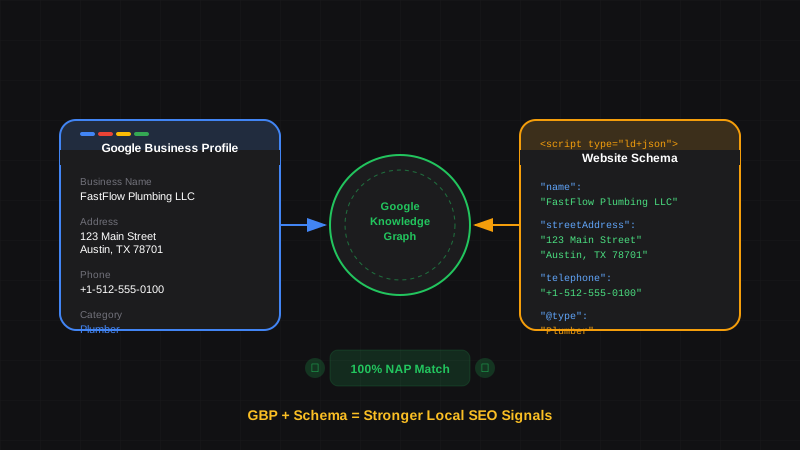
Google Business Profile and Schema Markup: How They Work Together for Local SEO
Learn how Google Business Profile and website schema markup work together. Align your GBP data with LocalBusiness schema for stronger local rankings and Knowledge Panels.
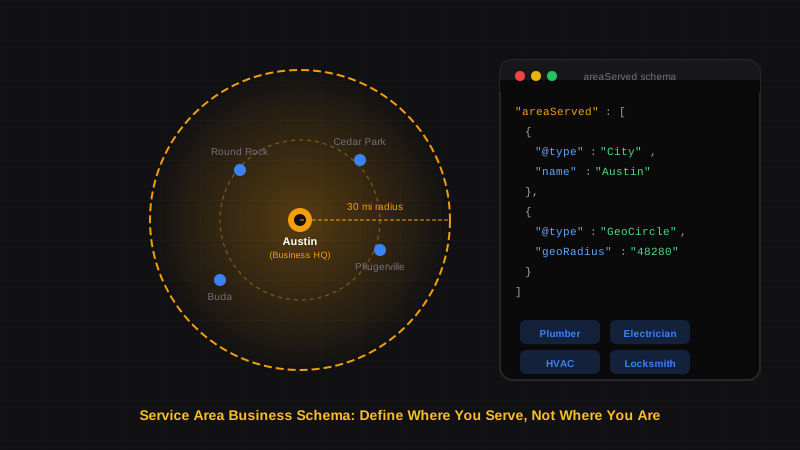
Service Area Business Schema: How Plumbers, Electricians & Mobile Services Should Use LocalBusiness
Learn how to implement schema markup for service area businesses. Complete guide with JSON-LD examples for plumbers, HVAC, cleaning services, and other businesses that travel to customers.
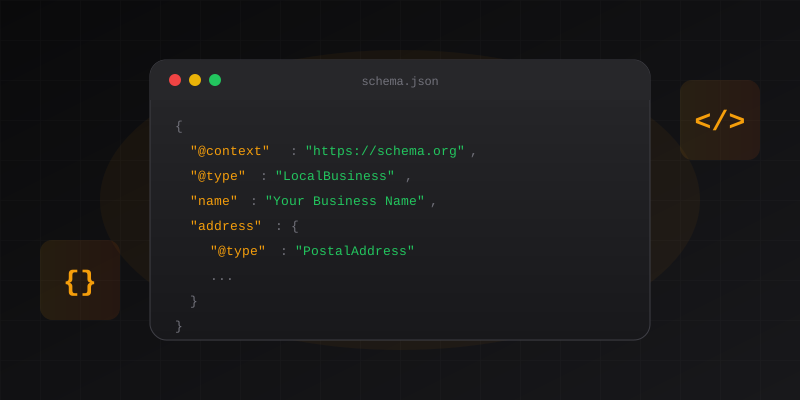
Schema Markup for Local SEO: How to Dominate Local Search in 2026
Learn how to implement LocalBusiness schema markup to boost your local SEO. Step-by-step guide with JSON-LD examples that pass Google's Rich Results Test.