Google Business Profile and Schema Markup: How They Work Together for Local SEO
Learn how Google Business Profile and website schema markup work together. Align your GBP data with LocalBusiness schema for stronger local rankings and Knowledge Panels.
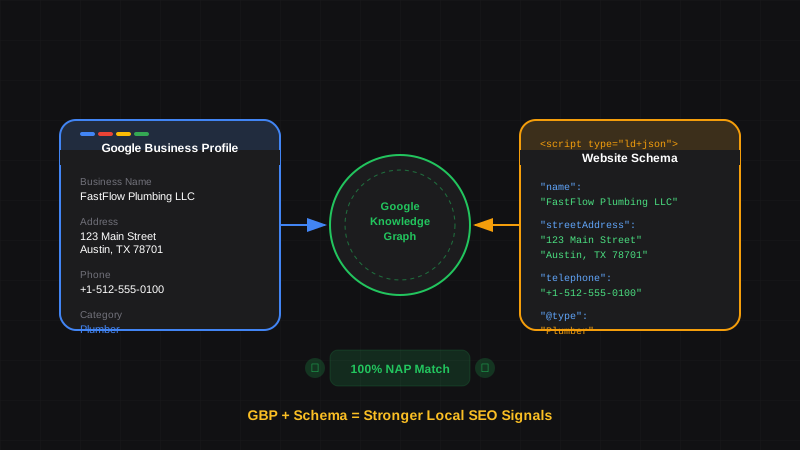
Key Takeaways
- GBP and website schema serve the same goal — telling Google accurate information about your business
- Consistency is everything — mismatched NAP (Name, Address, Phone) between GBP and schema confuses Google
- Schema strengthens your GBP signals — it's a second source confirming your business data
- Google uses both for Knowledge Panels — accurate schema can improve what appears in your branded search results
- Neither replaces the other — you need both GBP optimization AND website schema for maximum local SEO impact
One of the most common questions from local SEO clients: "I already have Google Business Profile set up. Do I still need schema markup on my website?"
The short answer: yes, absolutely.
Google Business Profile (GBP) and website schema markup aren't competitors — they're partners. GBP tells Google about your business through their platform. Schema tells Google about your business through your website. When both sources agree, Google's confidence in your business data increases dramatically.
Here's exactly how to align your Google Business Profile schema with your website markup for maximum local SEO impact.
Why You Need Both GBP and Schema#
Do I need schema markup if I have Google Business Profile?
Yes. Google Business Profile and schema markup serve complementary purposes. GBP provides business data through Google's platform, while schema provides it through your website. When both sources match, Google has higher confidence in your data accuracy, which can improve local rankings and Knowledge Panel displays.
Think of it like references on a job application. One reference is good. Two references saying the same thing? Much more convincing.
Google aggregates business information from multiple sources:
- Your Google Business Profile
- Your website (via schema markup)
- Third-party directories (Yelp, Yellow Pages, etc.)
- Social media profiles
When these sources align, Google trusts the data. When they conflict, Google has to guess — and that uncertainty hurts your visibility.
The NAP Consistency Rule#
NAP stands for Name, Address, Phone — the three core pieces of business identity. NAP consistency means these details are formatted identically across all platforms: your website, GBP, schema markup, and directory listings. Even minor differences (like "Street" vs "St.") can create confusion.
This is where most local SEO campaigns fail. Your GBP says one thing, your website says another, and your schema says something slightly different.
Example of inconsistent NAP:
| Source | Business Name | Address |
|---|---|---|
| GBP | FastFlow Plumbing LLC | 123 Main Street, Austin, TX |
| Website Footer | Fast Flow Plumbing | 123 Main St., Austin TX 78701 |
| Schema | FastFlow Plumbing, LLC | 123 Main Street, Austin, Texas 78701 |
To a human, these look like the same business. To Google's algorithm, there are three potentially different businesses with similar names.
Common NAP Inconsistencies That Hurt Rankings
- "LLC" vs "L.L.C." vs omitting it entirely
- "Street" vs "St." vs "St"
- State spelled out vs abbreviated
- Phone with dashes vs dots vs spaces
- Suite/Unit number included sometimes, omitted others
How to Align GBP and Schema#
Here's a systematic approach to ensure your Google Business Profile and schema markup tell the exact same story.
Audit Your Google Business Profile
Log into your GBP and document exactly how your business information appears:
- Business name (exact spelling, punctuation, legal suffixes)
- Address (exact format, abbreviations used)
- Phone number (exact format with area code)
- Business hours for each day
- Business categories (primary and secondary)
- Service area (if applicable)
Use GBP as Your Source of Truth
Your GBP listing is what Google already knows about you. Rather than trying to change both, match your schema to your GBP exactly. This is the faster path to consistency.
Build Your Schema to Match
Create your LocalBusiness schema using the exact same data from GBP. Copy the values character-for-character if needed.
Validate and Deploy
Test your schema with Google's Rich Results Test. Then add it to your website and verify it matches your GBP one more time.
Side-by-Side: GBP Data to Schema Properties#
Here's how GBP fields map to schema.org properties:
| GBP Field | Schema Property | Notes |
|---|---|---|
| Business name | name | Exact match required |
| Address | address (PostalAddress) | Same format as GBP |
| Phone number | telephone | Include country code |
| Website | url | Must match exactly |
| Business hours | openingHoursSpecification | Same hours as GBP |
| Category | @type | Use matching schema type |
| Description | description | Can expand on GBP description |
| Service area | areaServed | Match GBP service areas |
| Logo | logo | Use same logo image |
Complete Schema Example Matching GBP#
Here's a LocalBusiness schema that perfectly mirrors a Google Business Profile:
{
  "@context": "https://schema.org",
  "@type": "Plumber",
  "@id": "https://fastflowplumbing.com/#business",
  "name": "FastFlow Plumbing LLC",
  "image": "https://fastflowplumbing.com/images/logo.png",
  "logo": "https://fastflowplumbing.com/images/logo.png",
  "url": "https://fastflowplumbing.com",
  "telephone": "+1-512-555-0100",
  "email": "service@fastflowplumbing.com",
  "description": "Licensed plumber serving Austin and surrounding areas. Emergency repairs, water heater installation, drain cleaning, and repiping services.",
  "priceRange": "$$",
  "address": {
    "@type": "PostalAddress",
    "streetAddress": "123 Main Street",
    "addressLocality": "Austin",
    "addressRegion": "TX",
    "postalCode": "78701",
    "addressCountry": "US"
  },
  "geo": {
    "@type": "GeoCoordinates",
    "latitude": 30.2672,
    "longitude": -97.7431
  },
  "openingHoursSpecification": [
    {
      "@type": "OpeningHoursSpecification",
      "dayOfWeek": ["Monday", "Tuesday", "Wednesday", "Thursday", "Friday"],
      "opens": "07:00",
      "closes": "18:00"
    },
    {
      "@type": "OpeningHoursSpecification",
      "dayOfWeek": "Saturday",
      "opens": "08:00",
      "closes": "14:00"
    }
  ],
  "sameAs": [
    "https://www.facebook.com/fastflowplumbing",
    "https://www.instagram.com/fastflowplumbing",
    "https://www.yelp.com/biz/fastflow-plumbing-austin"
  ]
}
The sameAs Property Connects Your Profiles
The sameAs array should include all your official social profiles and directory listings. This helps Google understand that these profiles all belong to the same business entity, strengthening your overall presence.
Matching Business Categories to Schema Types#
Your GBP primary category should match your schema @type. Google uses over 4,000 business categories, but schema.org has fewer specific types.
| GBP Category | Schema Type |
|---|---|
| Plumber | Plumber |
| Electrician | Electrician |
| HVAC Contractor | HVACBusiness |
| Restaurant | Restaurant |
| Coffee Shop | CafeOrCoffeeShop |
| Hair Salon | HairSalon |
| Dentist | Dentist |
| Law Firm | LegalService or Attorney |
| Accountant | AccountingService |
| Real Estate Agency | RealEstateAgent |
| Auto Repair Shop | AutoRepair |
| Gym | HealthClub or ExerciseGym |
No Exact Match?
If no specific schema type matches your GBP category, use the closest parent type. For example, if your GBP category is "Mobile Dog Groomer," use PetGroomingService or LocalBusiness. Check the full hierarchy at schema.org/LocalBusiness.
Service Area Businesses: GBP and Schema Alignment#
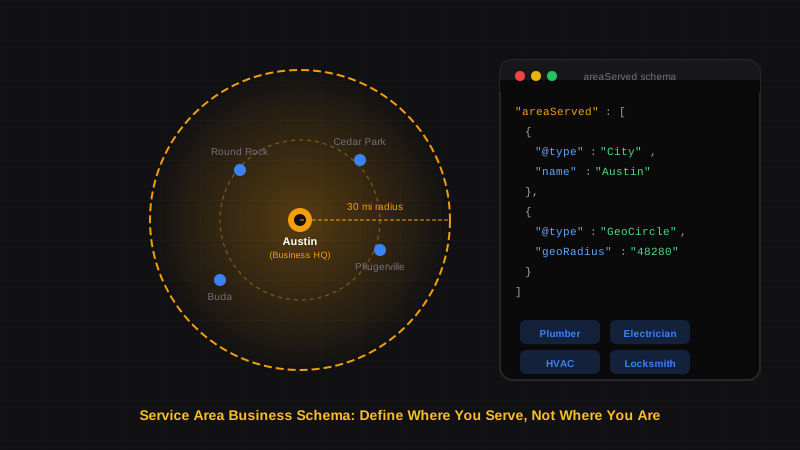
For service area businesses, the alignment rules are slightly different:
In GBP:
- You hide your address and show service areas instead
- You list cities, regions, or a radius
In Schema:
- Use
areaServedto match your GBP service areas - Include city-level address only (no street address)
- Match the exact cities/regions listed in GBP
{
  "@context": "https://schema.org",
  "@type": "Plumber",
  "name": "FastFlow Plumbing LLC",
  "image": "https://fastflowplumbing.com/logo.png",
  "url": "https://fastflowplumbing.com",
  "telephone": "+1-512-555-0100",
  "address": {
    "@type": "PostalAddress",
    "addressLocality": "Austin",
    "addressRegion": "TX",
    "addressCountry": "US"
  },
  "areaServed": [
    {"@type": "City", "name": "Austin"},
    {"@type": "City", "name": "Round Rock"},
    {"@type": "City", "name": "Cedar Park"},
    {"@type": "City", "name": "Pflugerville"}
  ]
}
If your GBP shows a 30-mile service radius, you can use the same in schema with GeoCircle:
"areaServed": {
  "@type": "GeoCircle",
  "geoMidpoint": {
    "@type": "GeoCoordinates",
    "latitude": 30.2672,
    "longitude": -97.7431
  },
  "geoRadius": 48280
}
Multi-Location Businesses: GBP and Schema#
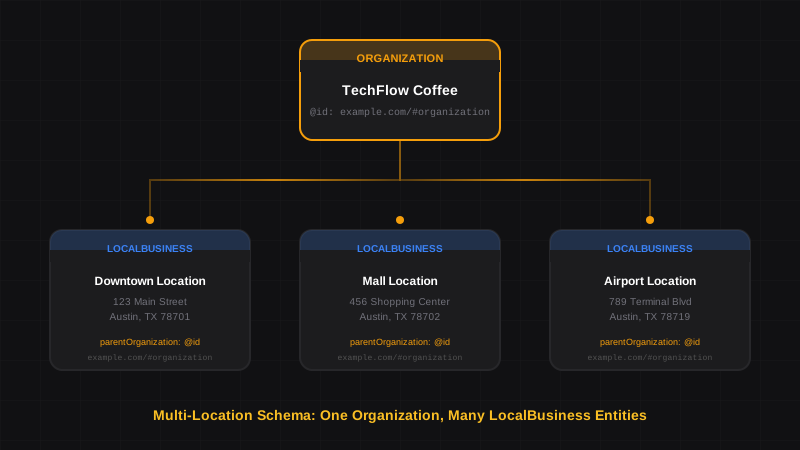
For businesses with multiple locations, each GBP listing should have a corresponding location page with matching schema.
The structure:
- One GBP listing per physical location
- One location page per GBP listing
- One LocalBusiness schema per location page
- One parent Organization schema on main site
The parentOrganization property links each location to your brand, just like your GBP listings all appear under the same business name.
"parentOrganization": {
  "@type": "Organization",
  "@id": "https://fastflowplumbing.com/#organization",
  "name": "FastFlow Plumbing LLC"
}
Learn more in our multi-location schema guide.
How Schema Improves Your Knowledge Panel#
When someone searches your business name, Google may display a Knowledge Panel — that information box on the right side of search results.
Google builds Knowledge Panels from multiple sources:
- Google Business Profile (primary source)
- Website schema markup (confirming source)
- Wikipedia/Wikidata (if applicable)
- Third-party directories
Schema helps Knowledge Panels by:
- Confirming your business hours match GBP
- Providing additional details (services, price range)
- Linking your social profiles via
sameAs - Showing your logo consistently
Common GBP and Schema Misalignments#
Watch for These Conflicts
These misalignments are easy to miss but can significantly impact your local rankings:
Hours mismatch:
- GBP shows 9am-5pm
- Schema shows 08:00-17:00 (same times, different format — this is fine)
- Schema shows 09:00-18:00 (different times — this is a problem)
Address format differences:
- GBP: "Suite 200"
- Schema: "Ste. 200" or "#200" or omitted entirely
Phone number format:
- GBP: (512) 555-0100
- Schema: +1-512-555-0100 (include country code in schema)
Business name variations:
- GBP: "FastFlow Plumbing"
- Schema: "FastFlow Plumbing LLC" or "Fast Flow Plumbing"
Audit Checklist: GBP to Schema Alignment#
Use this checklist to verify your GBP and schema are perfectly aligned:
- Business name matches exactly (including LLC, Inc., etc.)
- Street address format matches
- City, state, ZIP match exactly
- Phone number includes country code in schema
- Business hours match for every day
- GBP category matches schema
@type - Service areas match (for SABs)
- Website URL is identical
- Logo image URL is the same
- Social profiles listed in
sameAs
? Frequently Asked Questions
Do I need schema markup if I already have Google Business Profile?
Yes. GBP and schema serve complementary purposes. GBP tells Google about your business through their platform, while schema tells Google through your website. When both match, Google has higher confidence in your data, which can improve rankings and Knowledge Panel accuracy.
Should my schema match my Google Business Profile exactly?
Yes, especially for NAP (Name, Address, Phone). Your business name, address, and phone number should be formatted identically in both GBP and schema. Even minor differences like "Street" vs "St." can create confusion for Google.
How do GBP categories map to schema types?
Most GBP categories have a corresponding schema.org type. "Plumber" maps to Plumber, "Restaurant" maps to Restaurant, etc. If no exact match exists, use the closest parent type like LocalBusiness or ProfessionalService.
Does schema help my Google Knowledge Panel?
Yes. Google uses multiple sources to build Knowledge Panels, including both GBP and website schema. Consistent schema confirms your GBP data and can add details like services, price range, and social profiles that enhance your Knowledge Panel.
What if my GBP and schema have different information?
Fix it immediately. Conflicting information reduces Google's confidence in your data. Use your GBP as the source of truth and update your schema to match exactly. Then update any third-party directories for complete NAP consistency.
Should service area businesses hide their address in schema too?
Yes. If you've hidden your street address in GBP and show service areas instead, your schema should match: include city/state only in address and list your service areas in areaServed. Don't expose an address in schema that you've hidden in GBP.
Sync Your GBP and Schema Today#
Your Google Business Profile is only as powerful as the signals supporting it. Website schema markup provides that crucial second source, confirming your business data and strengthening your local SEO foundation.
The process is straightforward:
- Document your exact GBP information
- Generate LocalBusiness schema matching that data
- Add service areas if you're an SAB
- Connect multiple locations to a parent Organization
- Validate and deploy
SchemaDash generates clean, error-free schema that you can customize to match your GBP exactly. No syntax errors from WordPress plugins — just valid JSON-LD ready to complement your Google Business Profile.
Generate Schema in Minutes, Not Hours
Stop copying JSON-LD from Stack Overflow. SchemaDash generates Google-compliant schema markup that passes the Rich Results Test every time.
Start Your Free TrialRelated Articles
Schema Markup for Multi-Location Businesses: Franchises, Chains & Retail
Learn how to implement schema markup for multi-location businesses. Connect franchises, restaurant chains, and retail stores with proper Organization and LocalBusiness linking.
Service Area Business Schema: How Plumbers, Electricians & Mobile Services Should Use LocalBusiness
Learn how to implement schema markup for service area businesses. Complete guide with JSON-LD examples for plumbers, HVAC, cleaning services, and other businesses that travel to customers.
Schema Markup for Local SEO: How to Dominate Local Search in 2026
Learn how to implement LocalBusiness schema markup to boost your local SEO. Step-by-step guide with JSON-LD examples that pass Google's Rich Results Test.