LocalBusiness Schema That Actually Works
Generate LocalBusiness schema markup that passes Google's Rich Results Test. Learn what makes a good schema generator and how to avoid common validation errors.
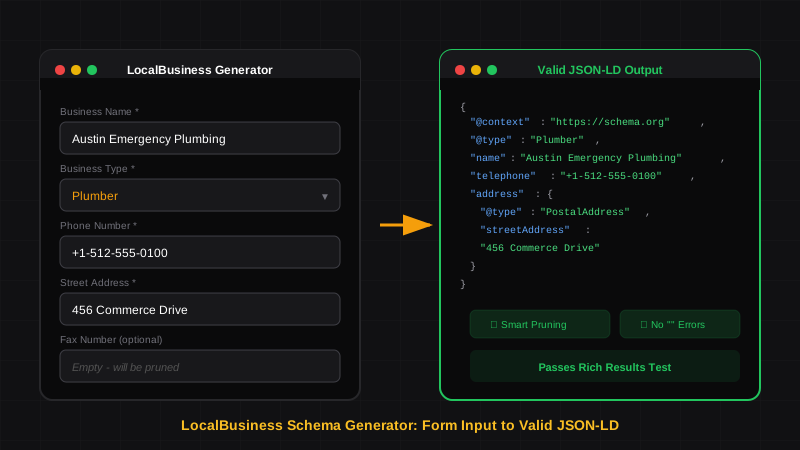
Key Takeaways
- Schema generators save hours of manual coding — fill in form fields, get valid JSON-LD output
- Not all generators are equal — many produce code with errors that fail Google's Rich Results Test
- Smart pruning is the key feature — generators that remove empty fields prevent syntax errors
- Copy-paste is safer than WordPress plugins — direct injection gives you full control over your schema
- Always validate before deploying — even generator output should pass the Rich Results Test
If you've ever tried to write LocalBusiness schema from scratch, you know the pain. Matching brackets, trailing commas, nested objects, ISO 8601 time formats — one misplaced character and Google ignores your entire script.
That's why LocalBusiness schema generators exist. Instead of hand-coding JSON-LD, you fill in form fields and the generator outputs valid structured data ready to paste into your website.
But here's what most SEOs discover the hard way: many schema generators produce broken code. They leave empty strings, forget required properties, or output invalid JSON that fails validation.
This guide covers what makes a good LocalBusiness schema generator, the common pitfalls to avoid, and how to ensure every script you deploy passes Google's Rich Results Test.
What is a LocalBusiness Schema Generator?#
What is a LocalBusiness schema generator?
A LocalBusiness schema generator is a tool that creates structured data markup from form inputs. You enter your business details — name, address, phone, hours — and the generator outputs properly formatted JSON-LD code. Good generators handle syntax, nesting, and validation automatically.
At its core, a schema generator translates human-readable inputs into machine-readable code:
| You Enter | Generator Outputs |
|---|---|
| Business name | "name": "Your Business" |
| Street address | "streetAddress": "123 Main St" |
| Monday 9am-5pm | "dayOfWeek": "Monday", "opens": "09:00", "closes": "17:00" |
| Phone number | "telephone": "+1-555-123-4567" |
The generator handles the JSON structure, property names, nesting, and syntax. You focus on your business data.
Why Use a Generator Instead of Manual Coding?#
Manual schema coding works for developers who write JSON daily. For SEO agencies managing dozens of client sites, it's not practical.
Time comparison:
Error comparison:
Manual coding introduces errors at every step:
- Forgotten commas between properties
- Mismatched brackets and braces
- Incorrect property names (
streetaddressvsstreetAddress) - Invalid time formats (
9:00 AMvs09:00) - Empty strings when fields are left blank
A well-built generator eliminates all of these.
The Problem with Most Schema Generators#
Here's what most SEOs don't realize: most free schema generators produce invalid code.
Not "slightly wrong" code — code that fails Google's Rich Results Test entirely.
The most common problem is empty string errors. When you leave a field blank, bad generators output this:
{
  "@context": "https://schema.org",
  "@type": "LocalBusiness",
  "name": "Austin Plumbing Co",
  "telephone": "+1-512-555-0100",
  "faxNumber": "",
  "foundingDate": ""
}
Those empty strings ("") cause Google to reject the entire schema. One blank field breaks everything.
Empty Fields Are Not Harmless
Google's JSON-LD parser treats empty strings as invalid data, not missing data. If your generator outputs "" for blank fields, your schema will fail validation. This is the #1 reason WordPress schema plugins fail.
What Makes a Good Schema Generator#
A quality LocalBusiness schema generator has these features:
1. Smart Pruning#
The generator should remove empty fields entirely instead of outputting empty strings.
Bad output:
"faxNumber": "",
"foundingDate": ""
Good output:
// These fields simply don't exist in the output
When a field is blank, it shouldn't appear in the JSON at all. This is called smart pruning, and it's the single most important feature to look for.
2. Correct Property Names#
Schema.org is case-sensitive. streetAddress is valid. streetaddress is not.
Good generators use the exact property names from schema.org specification:
| Correct | Incorrect |
|---|---|
streetAddress | streetaddress, street_address |
addressLocality | addresslocality, city |
openingHoursSpecification | openinghours, hours |
priceRange | pricerange, price_range |
3. Proper Data Formatting#
Time formats, phone numbers, and URLs must follow specific patterns:
- Times:
09:00not9:00 AM - Phone:
+1-512-555-0100(international format with country code) - URLs: Full URLs including
https://
4. Nested Object Handling#
LocalBusiness schema contains nested objects — address, geo, openingHoursSpecification. The generator must structure these correctly:
"address": {
  "@type": "PostalAddress",
  "streetAddress": "123 Main Street",
  "addressLocality": "Austin",
  "addressRegion": "TX",
  "postalCode": "78701",
  "addressCountry": "US"
}
Not flat:
"streetAddress": "123 Main Street",
"addressLocality": "Austin"
5. Specific Business Types#
Generic LocalBusiness works, but specific types are better. A good generator lets you select:
Restaurant,CafeOrCoffeeShopPlumber,Electrician,HVACBusinessDentist,MedicalClinicHairSalon,BeautySalonAutoRepair,AutoDealer- And many more
Learn more about matching your business type in our GBP and schema integration guide.
How to Evaluate a Schema Generator#
Before using any generator, run this quick test:
Leave Several Fields Blank
Don't fill in fax number, founding date, or other optional fields. Submit the form with gaps.
Check the Output for Empty Strings
Look at the generated code. If you see "" anywhere, the generator fails the smart pruning test.
Paste into Rich Results Test
Copy the generated code and paste it into Google's Rich Results Test. Click "Test Code."
Check for Errors
If you see red error messages about "empty string" or "invalid value," the generator is broken. Find a different tool.
The 30-Second Test
Generate schema with 3-4 blank optional fields. If the output passes Rich Results Test without errors, you've found a good generator. If it fails, move on.
Generators vs WordPress Plugins#
Many SEOs wonder: should I use a schema generator or a WordPress plugin?
The short answer: generators are safer.
WordPress schema plugins often fail because they use static templates that output whatever is in your database — including empty strings. They don't have smart pruning.
| Feature | Generator | WordPress Plugin |
|---|---|---|
| Smart pruning | Usually yes | Rarely |
| Control over output | Full | Limited |
| Validation before deploy | Yes | No |
| Works on any platform | Yes | WordPress only |
| Dynamic updates | Manual | Automatic |
The tradeoff: generators require manual copy-paste, while plugins can auto-update schema when your business info changes. But a broken plugin that outputs invalid code is worse than manual updates.
Recommended approach:
- Use a generator to create valid schema
- Copy-paste into your site's
<head> - Validate with Rich Results Test
- Update manually when business info changes
What a Generator Should Output#
Here's what clean LocalBusiness schema looks like — no empty strings, properly nested, all required fields:
{
  "@context": "https://schema.org",
  "@type": "Plumber",
  "@id": "https://austinplumbing.com/#business",
  "name": "Austin Emergency Plumbing",
  "image": "https://austinplumbing.com/images/storefront.jpg",
  "logo": "https://austinplumbing.com/images/logo.png",
  "url": "https://austinplumbing.com",
  "telephone": "+1-512-555-0100",
  "email": "service@austinplumbing.com",
  "description": "24/7 emergency plumbing services in Austin, TX. Licensed and insured.",
  "priceRange": "$$",
  "address": {
    "@type": "PostalAddress",
    "streetAddress": "456 Commerce Drive",
    "addressLocality": "Austin",
    "addressRegion": "TX",
    "postalCode": "78701",
    "addressCountry": "US"
  },
  "geo": {
    "@type": "GeoCoordinates",
    "latitude": "30.2672",
    "longitude": "-97.7431"
  },
  "openingHoursSpecification": [
    {
      "@type": "OpeningHoursSpecification",
      "dayOfWeek": ["Monday", "Tuesday", "Wednesday", "Thursday", "Friday"],
      "opens": "07:00",
      "closes": "18:00"
    },
    {
      "@type": "OpeningHoursSpecification",
      "dayOfWeek": "Saturday",
      "opens": "08:00",
      "closes": "14:00"
    }
  ],
  "sameAs": [
    "https://www.facebook.com/austinplumbing",
    "https://www.yelp.com/biz/austin-emergency-plumbing"
  ]
}
Notice what's not in this output:
- No
faxNumber: "" - No
foundingDate: "" - No empty
sameAsarray - No fields the business doesn't have
That's smart pruning in action.
Extending Generator Output#
A basic generator gives you LocalBusiness schema. For more advanced use cases, you'll extend the output manually:
Adding Service Area (for SABs)#
If you're a service area business, add areaServed:
"areaServed": [
  {"@type": "City", "name": "Austin"},
  {"@type": "City", "name": "Round Rock"},
  {"@type": "City", "name": "Cedar Park"}
]
Adding Parent Organization (for franchises)#
For multi-location businesses, add parentOrganization:
"parentOrganization": {
  "@type": "Organization",
  "@id": "https://corporate-site.com/#organization",
  "name": "National Plumbing Corp"
}
Adding Services#
List your services with hasOfferCatalog:
"hasOfferCatalog": {
  "@type": "OfferCatalog",
  "name": "Plumbing Services",
  "itemListElement": [
    {
      "@type": "Offer",
      "itemOffered": {
        "@type": "Service",
        "name": "Drain Cleaning"
      }
    }
  ]
}
Common Generator Mistakes to Avoid#
Even with a good generator, mistakes happen during input:
Input Carefully
Generators output what you input. Garbage in, garbage out. Double-check your data before generating.
Common input errors:
- Wrong phone format — Enter
+1-512-555-0100, not(512) 555-0100 - Partial URLs — Enter
https://yoursite.com, notyoursite.com - Inconsistent naming — Use the exact business name from your Google Business Profile
- Wrong time format — Enter
09:00, not9:00 AM - Missing country code — Always include
USfor addresses
Deployment Checklist#
Before adding generated schema to your site:
- All required fields are filled (name, address, phone)
- No empty strings in the output
- Business type matches your actual business
- Hours match your Google Business Profile
- Phone includes country code
- URL includes
https:// - Passes Rich Results Test with zero errors
- Coordinates (lat/long) are accurate
? Frequently Asked Questions
What is a LocalBusiness schema generator?
A LocalBusiness schema generator is a tool that creates JSON-LD structured data from form inputs. You enter your business information — name, address, hours, phone — and the generator outputs properly formatted code ready to add to your website. Good generators handle syntax, nesting, and validation automatically.
Why do some schema generators produce invalid code?
Most generators output empty strings ("") when you leave fields blank. Google's parser treats empty strings as errors, not missing data. This causes the entire schema to fail validation. Look for generators with "smart pruning" that remove empty fields instead of outputting blank values.
Should I use a schema generator or WordPress plugin?
Generators are generally safer. WordPress plugins often use static templates that output empty strings for unfilled fields, causing validation errors. Generators with smart pruning produce cleaner code. The tradeoff is manual updates — but valid schema that requires occasional manual updates beats broken automated schema.
How do I know if a schema generator is good?
Run a simple test: generate schema with several optional fields left blank, then paste the output into Google's Rich Results Test. If it passes without errors, the generator handles empty fields correctly. If you see "empty string" errors, find a different generator.
What's the difference between LocalBusiness and more specific types?
LocalBusiness is a generic type. Specific types like Plumber, Restaurant, or Dentist tell Google exactly what kind of business you are. Always use the most specific type available — it improves categorization and can help you appear in more relevant searches.
Do I need to validate schema from a generator?
Yes, always. Even good generators can produce errors if you input data incorrectly. Before deploying any schema, paste it into Google's Rich Results Test and confirm it passes with zero errors. This takes 30 seconds and prevents headaches later.
Generate Clean LocalBusiness Schema#
Building LocalBusiness schema manually is tedious and error-prone. A good generator handles the complexity so you can focus on accuracy.
What to look for:
- Smart pruning (no empty strings)
- Specific business types
- Proper nested structures
- Clean, validated output
SchemaDash generates LocalBusiness schema with smart pruning built in. Empty fields are automatically removed — no syntax errors, no failed validations. Enter your business data, copy the output, and deploy schema that passes the Rich Results Test on the first try.
For service area businesses, add the areaServed block manually using our examples. For multi-location businesses, add parentOrganization to link locations to your brand. The generator gives you the foundation — you customize from there.
Generate Schema in Minutes, Not Hours
Stop copying JSON-LD from Stack Overflow. SchemaDash generates Google-compliant schema markup that passes the Rich Results Test every time.
Start Your Free TrialRelated Articles
Schema Markup for Local SEO: How to Dominate Local Search in 2026
Learn how to implement LocalBusiness schema markup to boost your local SEO. Step-by-step guide with JSON-LD examples that pass Google's Rich Results Test.
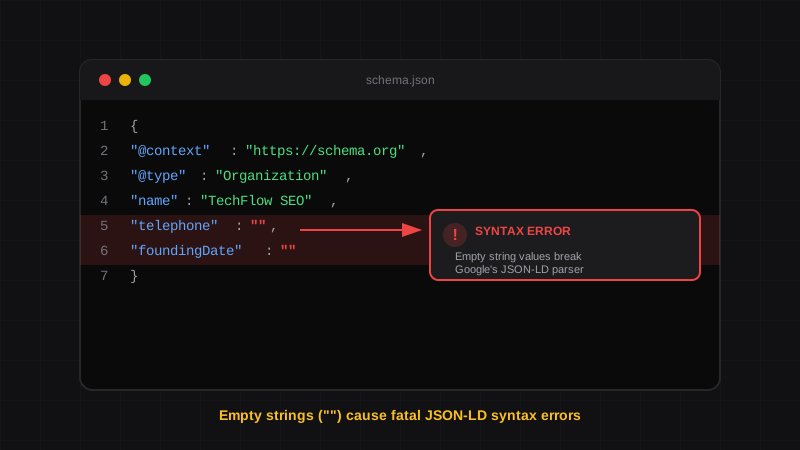
JSON-LD Syntax Errors: How to Fix Empty String Errors in Schema
Learn why empty strings cause fatal JSON-LD syntax errors in Google's Rich Results Test, and how to automate your schema to prevent them forever.
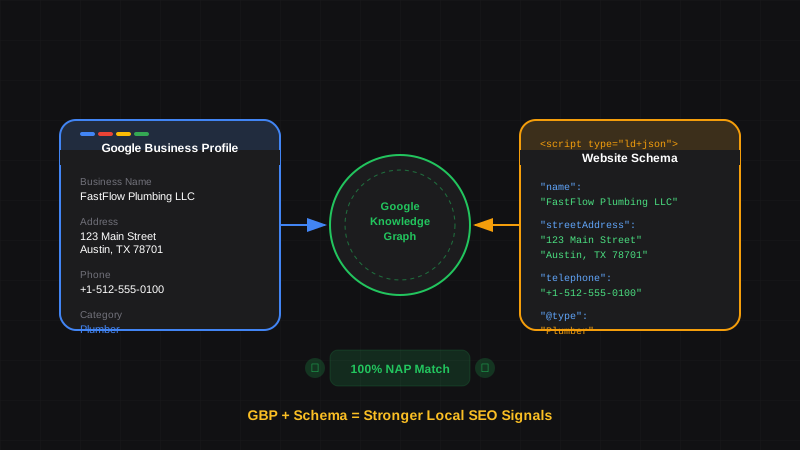
Google Business Profile and Schema Markup: How They Work Together for Local SEO
Learn how Google Business Profile and website schema markup work together. Align your GBP data with LocalBusiness schema for stronger local rankings and Knowledge Panels.